UPS Intelligent Reverse Logistics |
Log-In 
|
|
|
CompleteView® Returns ShipExec™ Printer Client Setup |
Sign on the CompleteView® Returns application
- Click on the Download Ship Exec Print Client hyperlink (NOTE: You will need Admin rights to install. Please reach out to your companies IT department).
- Select Run if the ShipExec™ Client Support Setup confirmation window is displayed.

Security scan information status window maybe displayed

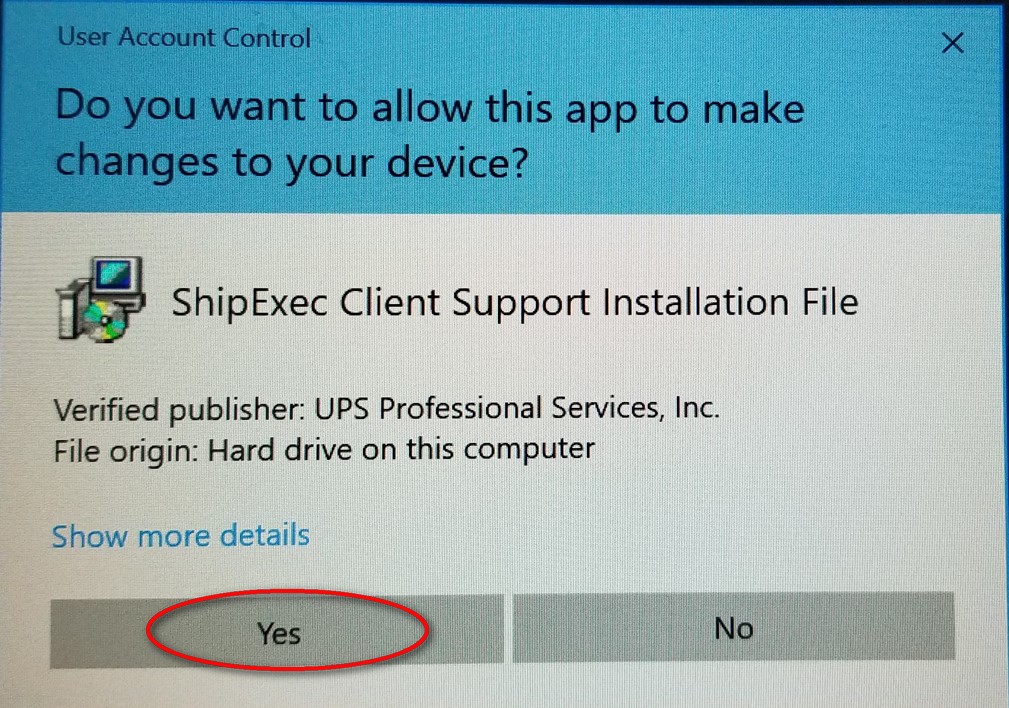
- User Account Control window may display to verify permission to continue installation, Select Yes.
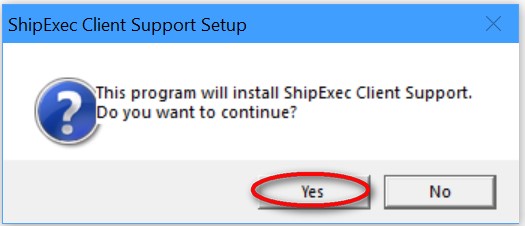
- The Install ShipExec™ Client Support Setup window will display, Select Yes.
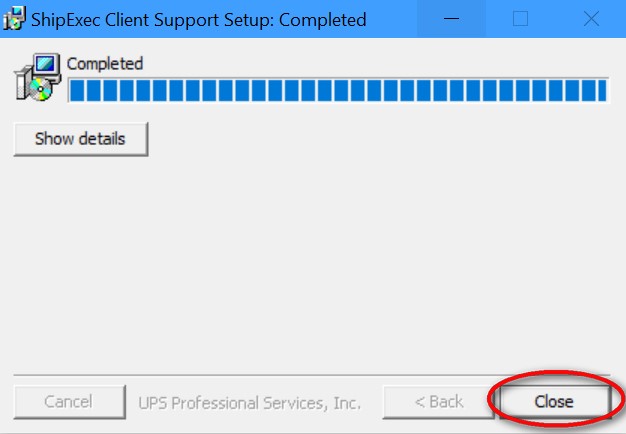
ShipExec™ Client Support Setup Window will display and the progress bar will show the process until completed.
- After completion, select Close
Congratulations!! Installation has completed; you are now able to generate your shipping label.
Press the button below to test your installation by printing a sample test label (not an actual label).
Copyright © 2011 - 2026, United Parcel Service of America, Inc. All rights reserved.
Web Site Terms of Use |
Privacy Policy
| Cookie Disclosure
| Service Terms and Conditions